Photobucket Great 1:1 Traffic Exchange

25 October 2008

Transferring Your Data: Move Data from old to a New Drive


When you add a new hard drive to an older PC, it's almost always faster than the drive already in use. But simply installing the new drive on your PC will strand your OS on the slower drive, forfeiting some benefits of upgrading. Make sure you use the new, faster, hard drive as your boot drive.

Retail hard-drive upgrade kits usually come with software that you can use to clone your existing drive to the new one, making the faster drive your boot drive. Alternatively, you can use a program like Spearit Software's MoveMe to move data over a network from an older PC to a new one.

But before you do this, pause and consider whether it may be time to start over. Over time Windows fills up with discarded files, drivers, and other crud. Adding a hard drive can be just the excuse you need to reinstall Windows from the system restore CD that came with your PC.

21 October 2008

Utilities To Recover Lost Passwords.

http://support.hubris.net/knowledge_base/illustrations/password.jpg
Here are a few utilities which will help you recover your lost or forgotten passwords :

Messenger Password Retriever is a password recovery tool that reveals the passwords of the following instant messenger applications

Mail PassView will help you Recover POP3/IMAP/SMTP email passwords.

IE Password Viewer is a small utility that reveals the passwords stored by Internet Explorer browser. It supports the new version of Internet Explorer 7.0 & the Beta version of Internet Explorer 8.0 too.

Dial Up Password will Recover VPN/RAS/Dialup passwords

Asterisk Logger will Recover passwords stored behind asterisk * characters.

PasswordFox will Reveal the usernames & passwords stored in Firefox.


12 October 2008

What is the Precursor of the Internet? Who Invented the Internet? When was the Internet First Created?

“What is the precursor to the Internet?”, “When was the Internet first created?”, or “Who Invented the Internet”, we are often asked. So here is a brief history of the Internet.

In part that depends on what you mean by “precursor” or “invented”, because several systems could claim that distinction. Online bulletin board systems, for instance. Or even packet radio, if your definition is a system which allowed people in disparate locations to communicate by typing on a terminal. But most people who remember a time before the Internet consider the answer to “What is the precursor to the Internet?” to be the ARPANET.

As Danny Goodman explains in his excellent book SpamWars, back in 1962 (yes, more than 40 years ago!), “experiments proved the concept of connecting computers to each other across a linkup originally using a regular telephone line. With much funding help through the U.S. Defense Department’s Advanced Research Projects Agency (ARPA), several universities and a few private corporations worked toward the goal of connecting multiple systems to allow researchers from one facility to run applications and access data at another facility in collaboration.”

While the concept was proven, it would be another 7 years before it was successfully put into effect, and then on a very limited basis.

“In 1969, the network built with ARPA funding, called ARPANET, successfully connected the first two, and then four, computers at different locations around the western United States,” explains Goodman. Those first four locations were educational sites in Los Angeles (UCLA) and Palo Alto (Stanford), and then Santa Barbara and Salt Lake City (University of Utah).

That was thirty-five years ago, back in 1969, but even though there was no turning back at that point, the evolution of connectivity went at a relative snail’s pace, and it would be another twenty years before the concept of regular people being able to communicate with other regular people outside of their own local computer systems was brought to the masses. That happened, according to Goodman, when MCI Mail became the first commercial computer service to offer the ability to send and receive email between two computer systems.

And now here we are, a mere sixteen years after MCI Mail’s initial offering, and most people who use the Internet can’t remember a time without email, without online shopping, instant messaging, and finding whatever information they need online.

But it all started, more than forty years ago, as an effort to allow academics to collaborate across the miles.

And if you are interested in this and more history and information about the Internet, you won’t find a more excellent resource than Goodman’s SpamWars.

source : http://www.theinternetpatrol.com

06 October 2008

1979-Mercedes Benz-240 Wallpaper


05 October 2008

Maybank2u Phishing Alert

I received a Maybank2U phishing email trying to get my user name, password and even the TAC code. Not that I have a lot of money inside my bank account. With the money in my bank account, I think it is just enough for you to go and buy some sweets. Yes, that is how poor I am. Heck, take the account if you wanted to but on a second thought, better NOT for security reasons.

Now, what is phishing you may ask. Phishing is the illegal deceptive process of trying to get confidential or private information such as the user name, password, financial details by commonly masquerading as established institutions or even trustworthy websites.

The most common phishing method is by e-mail which prompts users to click on a fake link that brings the user to a fake website in order to get sensitive or private information. It is surprising that even until now with all those phishing alerts, people are still getting scammed. You now basically know what is phishing, back to the focus of the topic. I am going to show you all an example of phishing email and also how to detect phishing attempt.

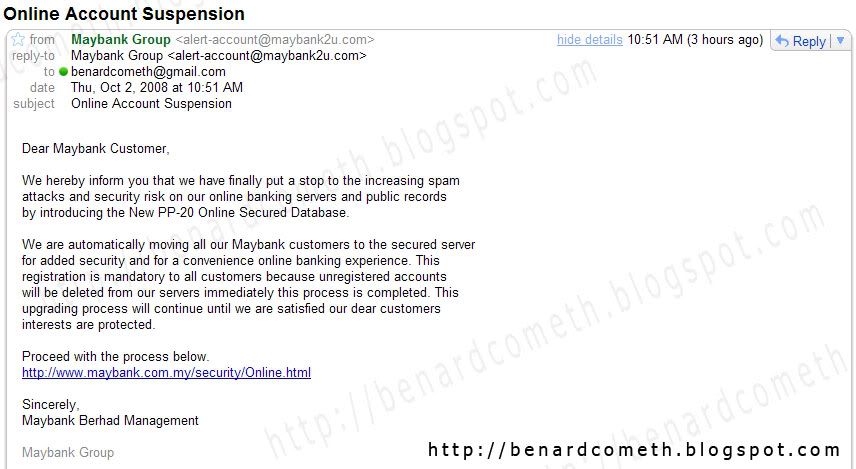
As I was saying earlier, I received an email from Maybank2U that asks for my user name and password. Maybank2U is an online portal of Maybank, a bank based in Malaysia if you don't know yet. Being the skeptical person I am, me spidey sense kicks into action and upon inspection found out that the email is not legitimate and is a phishing attempt.

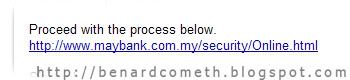
Hidden link/illegitimate link

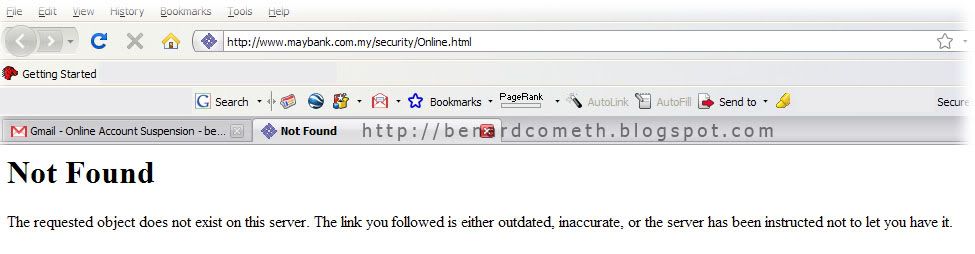
Always remember to not click links on emails. If you are really unsure then you can always copy and paste the link into new browser to access the said link to check. For example, I copied the said link to a new browser and the displayed link does not exists which further reinforce that this email is definitely a phishing attempt.

Copy and Paste into new browser

No, such link exists

In case you are wondering where the link leads to and why is it that a lot of people are still scammed, BenardCometh Revelations take the risk of being scammed by going with the process just for the sake of all readers out there which I am pretty sure is countable by ten fingers on a last count. Am I thoughtful or am I very thoughtful?

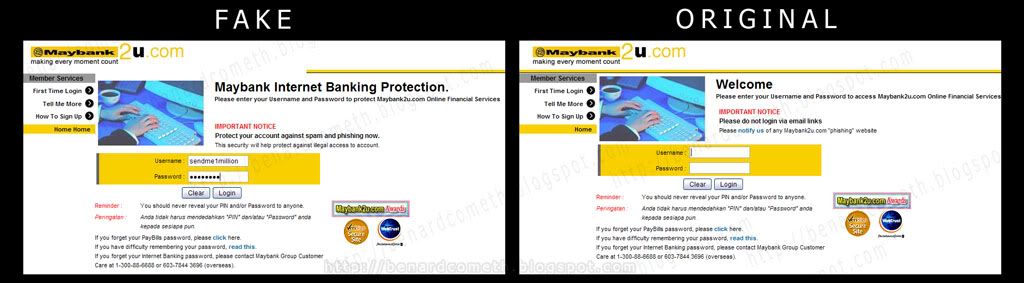
Hence, I clicked on the link and another window pop up which at a first glance almost look identical to the real/original Maybank2U website. Oh, the deception. Compare for yourself. The fake and the real in the following easy comparison created by yours truly.

Comparison between fake and real

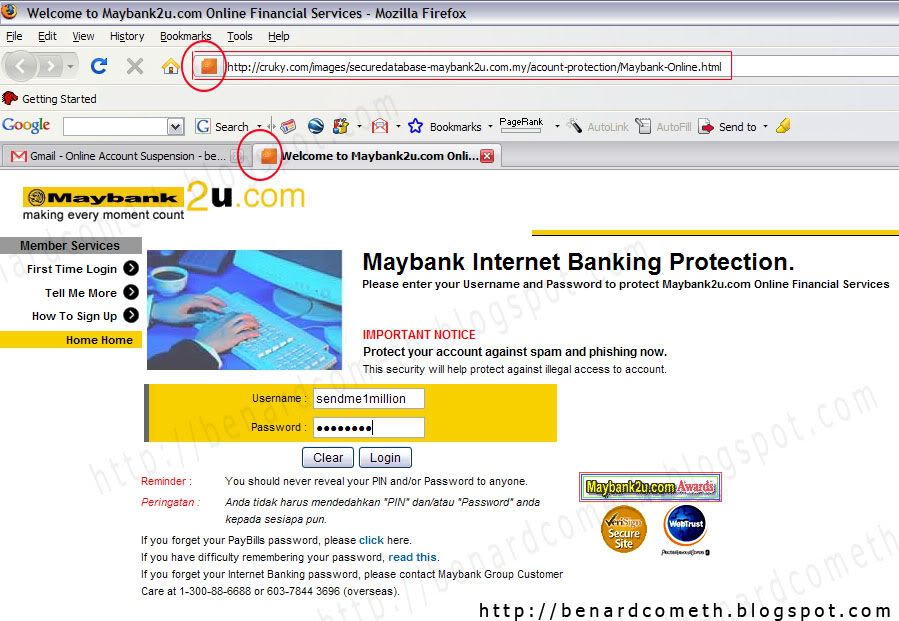
Note the following favicon as it will be referred later. Favicon is the icon circled in the red circle for the uninitiated.

My User name and password- Note the favicon

Then after I click login an error message pops up. Notice that the error message if from cruky and not Maybank2u.

01 October 2008

Blogumus: A Flash animated Label for blogger!

- Please look at my LABELS at right hand side

"Blogumus" is an Flash based tag cloud widget which uses scripts converted from Roy Tanck's WP Cumulus plugin for Wordpress. I fell in love with Roy's original Cumulus plugin when I saw it, and simply had to learn how to convert this for use in Blogger powered blogs. The result is the widget you can see in action at the top of this post. Hover your mouse over the Flash object to see the animation begin. In this post, I'll explain how you can add Blogumus to your own Blogger layout with ease!Width is set to 240pxHeight is set to 300px;Background color is whiteTest color is greyFont size is "12"

Update: Improved Widget Code

I have updated the code required to run this widget to activate links in the tag cloud Flash movie. If you have already installed Blogumus, please replace your widget code with the new updated code, or reference the additional lines to modify your existing installation.

How it works

This widget uses a combination of JavaScript and Flash animation to parse and display your blog labels. Once installed in your template, it should work "out of the box" without any additional tweaking required, though of course you may prefer to change the variables for color, background and size if appropriate :) You should also be able to move the Label Cloud widget through the Page Elements page of your dashboard if you prefer display in a different layout location. To see Blogumus in action, both Flash and Javascript must be installed and enabled for your internet browser. However, it does degrade relatively gracefully, and label links will still be clickable (though not animated) for those who do not use JavaScript of Flash (including search engine spiders).


Credits, support and requirements

Blogumus is based on the original WP Cumulus plugin by Roy Tanck, and was converted for use with Blogger layouts by myself. Please leave the credit links in the widget code intact. These will not be seen by the majority of your blog readers (as they will only display if JavaScript and Flash is not activated) but leaving these links intact is a great way of passing some link love on to Roy for all his hard work, and to inform other Blogger users that they can find the widget codes on this site.

Please click :
How to install Blogumus in your Blogger layout (1 )
or How to install Blogumus in your Blogger layout (update )


Credit & Thanks to Amanda Fazani (http:www.bloggerbuster.com)
Blog Widget by LinkWithin
Holding down CTRL while clicking the links below will open a new tab instead of a new window.
TrafficG.com - SuperSurf V2 - http://www.mytopfold.com