Photobucket Great 1:1 Traffic Exchange
Showing posts with label Internet Tips. Show all posts

19 January 2010

Warning against using Microsoft browser Internet Explorer


Logo: Microsoft admitted last week that its browser was the weak link after hackers in China hacked Google

By Graham Smith-19th January 2010
France has followed Germany's lead and urged web users to avoid using Internet Explorer until Microsoft develops a patch to fix a security flaw that led to hacks against websites including Google.

Both French and Germans have now been instructed to use a browser other than Explorer to ensure their computer's security.

Certa, a French government agency that protects against cyber threats, warned against using all versions of the web browser.

The move comes just days after Germany's Federal Office for Information Security, or BSI, said even running Explorer in 'security mode' did not render it fully safe.

Microsoft admitted last week that its browser was the weak link after hackers in China hacked Google to pry into the email accounts of human rights activists.

It said the security hole can be closed by setting the browser's Internet security zone to 'high'.

Other German security experts have echoed the government warning, telling users to wait for Microsoft to develop a patch.

But the BSI insisted that setting Explorer's security setting to 'high' would not be sufficient enough to prevent further hacks.

'Using Internet Explorer in "secure mode", as well as turning off Active Scripting makes attacks more difficult, but can not fully prevent them,' the BSI said in a statement.

Thomas Baumgaertner, a Microsoft spokesman in Germany, said the company was aware of the warning, but did not agree with it.

He pointed out that the attacks on Google were by highly motivated people with a very specific agenda.

Mr Baumgaertner said 'These were not attacks against general users or consumers. There is no threat to the general user, consequently we do not support this warning.'

But Graham Cluley of anti-virus firm Sophos said instructions on how to exploit the flaw had been posted in detail online.

He said: 'This is a vulnerability that was announced in the last couple of days. Microsoft have no patch yet and the implication is that this is the same one that exploited on the attacks on Google earlier this week.

'The way to exploit this flaw has now appeared on the internet, so it is quite possible that everyone is now going to have a go.

'We've been working with Microsoft to see if the damage can be mitigated and we are hoping that they will release an emergency patch.'

'One thing that should be stressed is that every browser has its security issues, so switching may remove this current risk but could expose you to another.'-www.dailymail.co.uk

19 December 2009

Sex, porn, and Michael Jackson top kids' searches in 2009

Sex, porn, and Michael Jackson were among the most popular items kids searched for online in 2009, as tracked by Symantec's OnlineFamily.Norton.

Symantec on Thursday revealed the top 100 favorite search terms among children 18 and under found by its free OnlineFamily.Norton service, which helps parents monitor their kids' online searches. Though innocuous terms like Sesame Street and "New Moon"--a popular movie in the Twilight vampire series--made the cut, sex showed up fourth on the list for boys and fifth for girls, following YouTube, Google, and Facebook as the three top terms.

Top ten search terms by boys and girls for 2009

Top 10 search terms by boys and girls for 2009 (Credit: Symantec)

For boys, the top 25 search terms focused on social-networking sites, shopping sites, and certain adult terms. Girls seemed to favor subjects related to music, TV shows and movies, and celebrities.

Speaking of celebrities, to no one's surprise, the late Michael Jackson was the most searched for celebrity, coming in at number 12, followed by pop singer Taylor Swift at No. 13. Other hot stars that made the list included Miley Cyrus, Britney Spears, Beyonce, the Black Eyed Peas, the Jonas Brothers, Eminem, Rihanna, and Chris Brown (who was in the news this year after admitting that he assaulted ex-girlfriend Rihanna).

Searching for celebrities online, however, may be hazardous to your PC's health. Symantec has found found that these searches sometimes draw people to dangerous Web sites, which spew out viruses, spam, and other malware.

Kids seven and under searched for items related to video games, while older kids were heavy into music, with 34 percent of teens and 27 percent of tweens searching for music-related topics. The Miley Cyrus song "Party in the USA" was the most-searched for tune among kids, while "Boom Boom Pow" by the Black Eye Peas took the No. 2 spot.

Top 10 searches by age group for 2009

Top 10 searches by age group for 2009 (Credit: Symantec)

Tech terms that popped up on the list included MySpace at No. 8, MSN at No. 33, the iPod Touch at No. 98, and Bing last at No. 100.

To compile its top 100 list, Symantec tracked 14.6 million searches run by users of its OnlineFamily.Norton service and ranked the terms according to ones submitted most frequently to those submitted the least. The terms were collected anonymously, so none could be associated with any specific children or families. - http://news.cnet.com

15 November 2009

10 Ways to Spot an E-Mail Scam

The increasing flood of e-mail hitting your inbox can lower the guard of even the most cautious person. In the rush to keep up with important notes, it's easier than ever to fall prey to the scam artists and identity thieves who lurk online.

E-mail scams and phishing attempts evolve constantly, hoping to take advantage of the latest trends and current events. Although the e-mails change, the people behind them inadvertently send up the same warning signs again and again. We dug through mountains of spam to find the most prevailing trends. We've collected some actual scam e-mails and highlighted the warning signs to help you spot a hustle the next time one lands in your inbox.

1. Requests for personal information
No legitimate organization will ask for your social security, bank account or PIN number via e-mail – and none will include a link, sending you to a form to enter it. No matter how authentic these emails may look, ignore 'em.

2. Watch for typos or spelling mistakes
Scam artists are street smart, but many flunked basic grammar (or barely speak English). Look for mistakes like inappropriate hyphens or confusing "your" and "you're." If the note has multiple typos or grammatical errors, odds are it's not legitimate.

3. Clickable Web links in e-mails
Don't trust links to Web sites in e-mails. What might look like a legitimate address is often linked to a third-party site that looks official, but is actually run by thieves and scammers. These are the fast track to identity and financial theft.

4. 'Market research' or surveys that ask you for personal information.
Disguising scam e-mails as marketing is a classic ploy. You'll be asked to fill out a survey or enter a contest – requiring you to give personal information or "log on" to your account. Once you've done so, the scammers can use it themselves.


5. Stock tips from random people or companies
Got a "hot stock tip" via e-mail? It's probably a "pump and dump" scheme. The sender already owns shares – and when you and others act on the "tip," the stock price soars and he sells fast – leaving you with virtually worthless shares.

6. Attachments in e-mails from anyone you don't know
It should be common sense, but just in case, we'll remind you again: Don't open an attachment from someone you don't know – even if it appears to be your bank or credit card company. It's almost always a virus or spyware meant to steal your personal information.

7. Wordless e-mails
Some legitimate looking "e-mails" are actually just images. The danger with these is that clicking anywhere in the body takes you to a suspect Web site – where you may be fooled into entering personal information, or the scammer may slip spyware onto your machine.

8. Outdated information
Some scammers like to pose as technical- or customer support from a company you associate with – but fail to keep up with current events. For example, in the example above, the senders forgot that Earthlink bought Mindspring in 2000.

9. Red-flag phrases
If you see the phrases "verify your account," "you have won the lottery" or "if you don't respond within XX hours, your account will be closed," it's a scam – every time. Hit the delete button and don't look back.

10. Generic greetings
While you can't trust every e-mail that knows your name, you can definitely ignore the ones that start "Dear member" or "Hello friend." If your bank or credit card company is writing you, it knows who you are. So do your friends.
- www.switched.com

20 October 2009

Share Internet Connection Wirelessly, Without a Router


If you have more than one computer or a Wi-Fi phone at home, but no Wi-Fi router, you can still share your Internet connection wirelessly from the PC that's hooked to your modem. The gist is that the main PC broadcasts its Internet connection over its Wi-Fi card and thus acts like a router itself, allowing other devices to connect.

For step-by-step instructions, click here for Windows Vista PCs, here for Windows XP, and here for Macs.

04 December 2008

Even Google Gets Frugal in the Recession

By Anita Hamilton Thursday, Dec. 04, 2008

Even internet superstars fall to earth eventually. While recent reports of layoffs and other cost-cutting measures at Google have been greatly exaggerated, the search giant's culture of unbridled spending is finally coming to a halt. And that's probably a good thing. "Hard times have forced discipline on them," says Sanford Bernstein's Jeffrey Lindsay, who predicts, "They'll come back really powerfully. They can emerge as a much leaner and more competitive player."

It's not just
afternoon tea that's falling by the wayside at the famously employee-friendly firm. Although Google hasn't handed out pink slips to any of its 20,000 full-time employees, it has cut about half of its additional 10,000 contract workers in recent months. And, previously one of the biggest recruiters of MBAs on college campuses, Google is eschewing such pricey new hires, although it is still bringing on new engineers.

Source: http://www.time.com

12 October 2008

What is the Precursor of the Internet? Who Invented the Internet? When was the Internet First Created?

“What is the precursor to the Internet?”, “When was the Internet first created?”, or “Who Invented the Internet”, we are often asked. So here is a brief history of the Internet.

In part that depends on what you mean by “precursor” or “invented”, because several systems could claim that distinction. Online bulletin board systems, for instance. Or even packet radio, if your definition is a system which allowed people in disparate locations to communicate by typing on a terminal. But most people who remember a time before the Internet consider the answer to “What is the precursor to the Internet?” to be the ARPANET.

As Danny Goodman explains in his excellent book SpamWars, back in 1962 (yes, more than 40 years ago!), “experiments proved the concept of connecting computers to each other across a linkup originally using a regular telephone line. With much funding help through the U.S. Defense Department’s Advanced Research Projects Agency (ARPA), several universities and a few private corporations worked toward the goal of connecting multiple systems to allow researchers from one facility to run applications and access data at another facility in collaboration.”

While the concept was proven, it would be another 7 years before it was successfully put into effect, and then on a very limited basis.

“In 1969, the network built with ARPA funding, called ARPANET, successfully connected the first two, and then four, computers at different locations around the western United States,” explains Goodman. Those first four locations were educational sites in Los Angeles (UCLA) and Palo Alto (Stanford), and then Santa Barbara and Salt Lake City (University of Utah).

That was thirty-five years ago, back in 1969, but even though there was no turning back at that point, the evolution of connectivity went at a relative snail’s pace, and it would be another twenty years before the concept of regular people being able to communicate with other regular people outside of their own local computer systems was brought to the masses. That happened, according to Goodman, when MCI Mail became the first commercial computer service to offer the ability to send and receive email between two computer systems.

And now here we are, a mere sixteen years after MCI Mail’s initial offering, and most people who use the Internet can’t remember a time without email, without online shopping, instant messaging, and finding whatever information they need online.

But it all started, more than forty years ago, as an effort to allow academics to collaborate across the miles.

And if you are interested in this and more history and information about the Internet, you won’t find a more excellent resource than Goodman’s SpamWars.

source : http://www.theinternetpatrol.com

05 October 2008

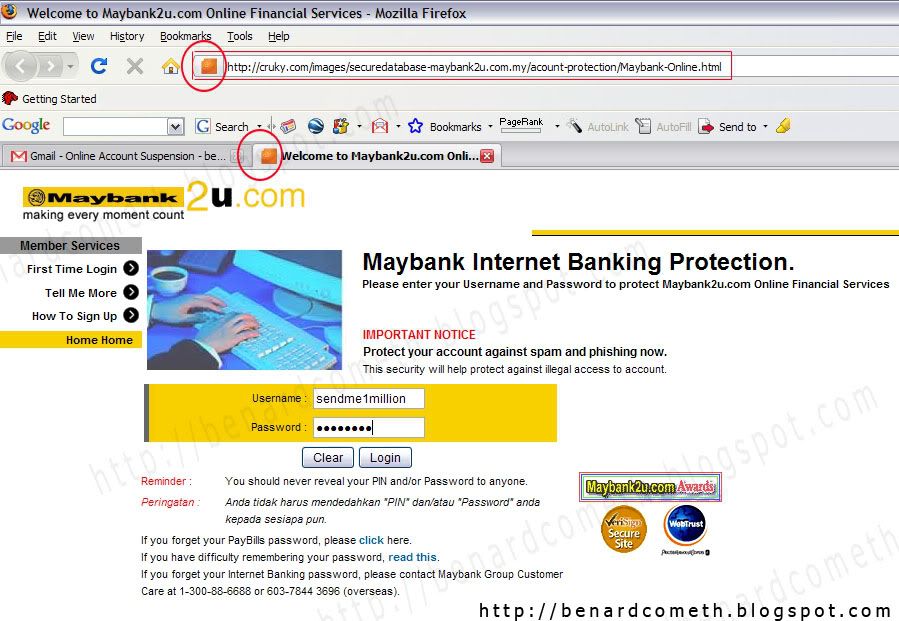
Maybank2u Phishing Alert

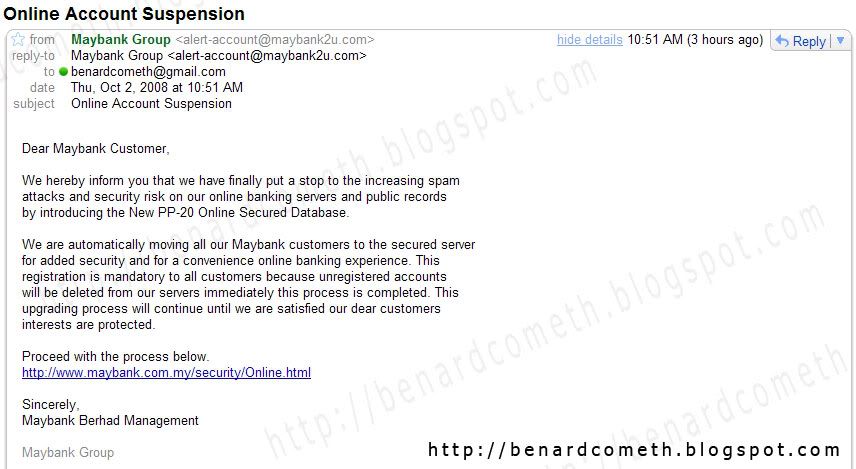
I received a Maybank2U phishing email trying to get my user name, password and even the TAC code. Not that I have a lot of money inside my bank account. With the money in my bank account, I think it is just enough for you to go and buy some sweets. Yes, that is how poor I am. Heck, take the account if you wanted to but on a second thought, better NOT for security reasons.

Now, what is phishing you may ask. Phishing is the illegal deceptive process of trying to get confidential or private information such as the user name, password, financial details by commonly masquerading as established institutions or even trustworthy websites.

The most common phishing method is by e-mail which prompts users to click on a fake link that brings the user to a fake website in order to get sensitive or private information. It is surprising that even until now with all those phishing alerts, people are still getting scammed. You now basically know what is phishing, back to the focus of the topic. I am going to show you all an example of phishing email and also how to detect phishing attempt.

As I was saying earlier, I received an email from Maybank2U that asks for my user name and password. Maybank2U is an online portal of Maybank, a bank based in Malaysia if you don't know yet. Being the skeptical person I am, me spidey sense kicks into action and upon inspection found out that the email is not legitimate and is a phishing attempt.

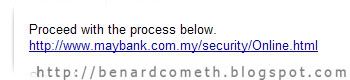
Hidden link/illegitimate link

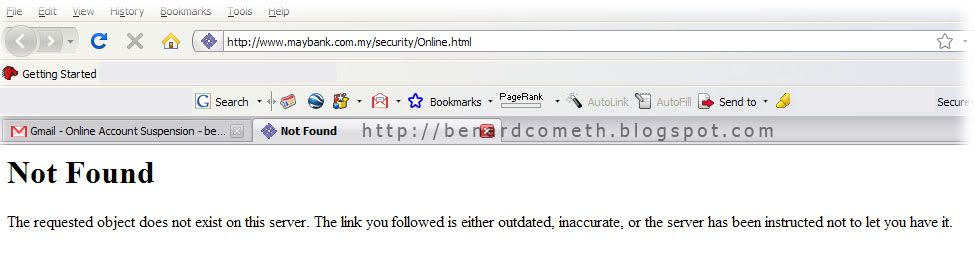
Always remember to not click links on emails. If you are really unsure then you can always copy and paste the link into new browser to access the said link to check. For example, I copied the said link to a new browser and the displayed link does not exists which further reinforce that this email is definitely a phishing attempt.

Copy and Paste into new browser

No, such link exists

In case you are wondering where the link leads to and why is it that a lot of people are still scammed, BenardCometh Revelations take the risk of being scammed by going with the process just for the sake of all readers out there which I am pretty sure is countable by ten fingers on a last count. Am I thoughtful or am I very thoughtful?

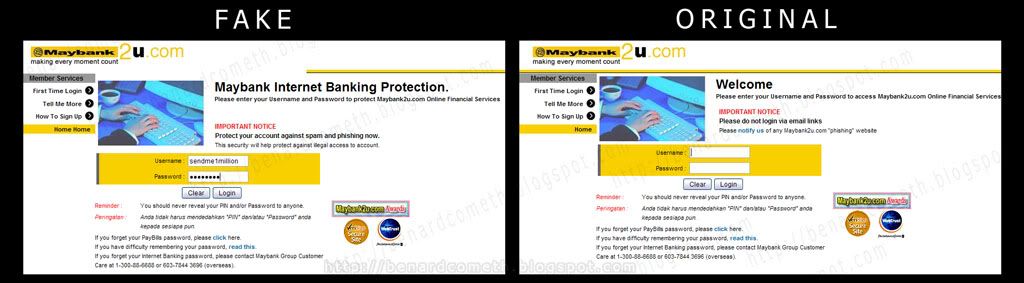
Hence, I clicked on the link and another window pop up which at a first glance almost look identical to the real/original Maybank2U website. Oh, the deception. Compare for yourself. The fake and the real in the following easy comparison created by yours truly.

Comparison between fake and real

Note the following favicon as it will be referred later. Favicon is the icon circled in the red circle for the uninitiated.

My User name and password- Note the favicon

Then after I click login an error message pops up. Notice that the error message if from cruky and not Maybank2u.

27 September 2008

Add your blog into the top search directory to gain more traffic!

For long term use, you can also add your blog into search directories to gain more traffic. They are not as useful as search engines but they are going to help in a way or two. They worked differently as search engines as search engines you normally type in a keyword then they will start to search but directory is something like a catergory of different interest and you can get your targeted audience when users are searching this system.

Anyway its free and you just have to spend a little more time to do this entry.

Some of the top directory

www.dir.yahoo.com

www.directory.google.com

www.search.com.sg

www.dmoz.org

www.searchdelivery.com

www.searchingweb.com

I have already added my site to all of the web directory, this process is boring that that also will bring many of others to you as well and its only a one time entry.

Enjoy and good traffic!

26 September 2008

co.cc is a free domain. It's not only URL forwarding but we can setup DNS Records, A, MX, and CNAME records. We can change our blog's name to become "name.co.cc". It's more simple than we use domain "name.blogspot.com". To change our default blogspot name to co.cc domain name there are some steps to do. Here is the tutorial to setup domain co.cc

1. Open your browser to co.cc
2. Then regiter a domain that you want to use.

3. If it's no available you have to find another domain name. But if it's available then you can register it.

4. The you have to setup your domain. Got to "setup-->Manage domain"

5. Choose
"Zone Records"
6. In the coloumn "Host" fill it with your domain name (www.yourdomainname.co.cc")

7. Choose "CNAME" for "Type"

8. In the "Value" box fill it with
"ghs.google.com"
9. Then click "Setup" Button.


The next step is make some setup in blogspot.
1. Login to Bloggr/blogspot then choose
"Setting-->Publishing"
2. Then choose
"Switch to: • Custom Domain
3. Then click on
"Already own a domain? Switch to advanced settings"
4. Fill it with your new domain in the
"Your Domain" coloumn.


5. To Finish click "Save Setting" Button.
It will take 1-48 hours for your new domain to work. So be patient....


credit to kendhin.

21 September 2008

Network connection is showing limited or no connectivity problem


"Have you ever facing Limited Or No Connectivity problem with your network?

or your network connection gets stuck "Acquiring IP Address"?
Why is it happen and how to fix it?

Limited or No Connectivity is due to assigning problem between IP to your LAN Connection.
By right, your IP should be assign with the 192.168.x.x but it assign an IP which in group 168.x.x.x . (you can check this by running Run>cmd>ipconfig)

Many user just simply disable the message by untick the "Notify me when this connection has limited or no connectivity" check box, this basically would not solve the problem. Do you understand what does "notify" means? I'm pretty sure the answer is YES. So,if you untick the "Notify me when this connection has limited or no connectivity" checkbox, you will get notified when the problem arise.

But then,if you untick the checkbox,the meaning would be like "Do Not Notify me when this connection has limited or no connectivity". You will end up wondering that you have fix the problem but it is actually still there. Am I right or Am I right?

Normally 192.168.1.1 is the IP for your router which is also called the gateway IP.

Just follow the few steps, and try wether it works or not.(The following steps work for the router using 192.168.1.1 IP)
  1. Click on Start button>All Programs>Accessories>Communication>Network Connection
  2. Right click the Local Area Connection and go to properties.
  3. Find the entry called "Internet Protocol (TCP/IP)" and double click it. or highlight it then click on properties.
  4. It should be set to "Obtain an IP address automatically", set it to "Use the following IP".
  5. In the IP address field type: 192.168.1.xxx (replace xxx with any number between 2 to 255) I just choose number 8 because 8 is 'ong' mah, so hopefully it bring luck to solve the problem. Just click on the Subnet mask field and Windows should fill it in automatically. In the Default gateway field type: 192.168.1.1 (your modem's gateway IP). The next radio button should already be set to "Use the following DNS server addresses", if not set it. In the first field type 202.188.0.133 and 202.188.1.5 for the second field.This is TMNet DNS number.
Close both the open windows with OK. wait for a few seconds or you can off the modem about 10 seconds and on it back. Now see if the computer can connect to the network.

FOR MORE INTERESTING ARTICLES AND TIPS,VISIT:
http://streamyxzone.blogspot.com

11 September 2008

Google Chrome works faster than firefox ???

On 3 Sept.2008 Google announced a new open source browser called "Google Chrome"
Google Chrome works faster than firefox...

Google ChromeBlogger "Create Post" page with Google Chrome

If you want to learn more about Google Chrome, visit Google Chrome Comic (link)
You can download Google Chrome here (link) need internet connection when install it...

Software Download :
Google Chrome full (offline) Installer (Download) 7 MB


08 September 2008

Melajukan FireFox Browser


Tip Untuk Melajukan Surfing Menggunakan Firefox
- Credit to Tok_Aslim

kepada pengguna Streamyx... kelajuan boleh mencecah 5 kali bila surfing dan telah terbukti...

1. Buka firefox anda, dantaip kat address tu ----> about:config
2. Right click kat mana2 pastu select New -> Integer ...... dan paste skrip berikut -----------> nglayout.initialpaint.delay .............. pastu set 300

kalau tidak berpuas hati dgn 300.. boleh disetkan kepada -----> 0

kalau masih tidak suka dgn kelajuannya... cuba yg ini pula, type skali lagi ----> about:config

1. tengok config tu dan scroll down sampai jumpa skrip tersebut
network.http.pipelining
network.http.proxy.pipelining
network.http.pipelining.maxrequests

2. double click kat situ utk tukar false tu kepada true, contohnya -

network.http.pipelining - true
network.http.proxy.pipelining - true
network.http.pipelining.maxrequests - 30 (sekali request 30 mai)

3. pastu type skali lg -----> about:config dan select New -> Integer dan paste skrip tersebut --->
nglayout.initialpaint.delay
set kepada 0

dan kita restart firefox (tutup dan buka semula)

kita boleh test... sepatutnya akan melajukan 2 hingga 3 kali lebih laju daripada biasa.. Selamat Mencuba......


Kredit to putera aslim at webkl.net

atau kalau nak lagi laju & power boleh jugak try configuration seperti bawah ini:

network.http.max-connections;48
network.http.max-connections-per-server;24
network.http.max-persistent-connections-per-proxy;16
network.http.max-persistent-connections-per-server;8
network.http.pipelining;true
network.http.pipelining.maxrequests;0
network.http.pipelining.ssl;true

("network.http.pipelining.firstrequest"; true) Skrip ni kalau tak ada, kena lah buat dan cara nya Right click kat mana2 pastu select New -> Boolean ...... dan paste skrip berikut -----------> network.http.pipelining.firstrequest .............. lepastu pilih true

-Selamat mencuba

Blog Widget by LinkWithin
Holding down CTRL while clicking the links below will open a new tab instead of a new window.
TrafficG.com - SuperSurf V2 - http://www.mytopfold.com